TL;DR
- A practical way to move from writing in Obsidian to publishing on a live site without copy-paste, manual uploads, or brittle one-off scripts.
External Memory Series — File-based memory for AI-assisted work (overview · 1 Implementation · 2 Productivity · 3 vs the diagram · 4 Governance)
Publishing Obsidian Drafts Through GitHub Actions
The problem is not writing inside Obsidian. The problem is everything that happens after the draft feels ready: copy-pasting text into a CMS, resizing images by hand, hunting for the latest filename, and wondering whether the live site will match the note you just finished.
A GitHub Actions publish workflow solves that by turning the handoff into a repeatable path. The draft stays in Obsidian, the repository becomes the transport layer, and the workflow becomes the only place where publishing logic lives.
What is Obsidian-to-site CI publishing?
Obsidian-to-site CI publishing automates moving vault drafts through GitHub Actions into a build pipeline—so writing stays in Obsidian while deploys stay reproducible and hands-off.
Who it is for: Obsidian users, technical bloggers, and teams using markdown git workflows.
What you will learn: pipeline architecture; secrets and path triggers; and pitfalls when syncing vault folders to a site repo.
Why This Matters
Manual publishing looks harmless until it starts to multiply small mistakes. One missing image path, one broken frontmatter field, or one forgotten status flag can waste the time you saved by writing quickly in the first place.
That matters even more when the site is not just a personal blog but a system with real constraints. You want draft notes to stay private, you want the live site to publish only intentional content, and you want a workflow that can fail safely when something is missing.
In practice, the best publishing systems are boring. They do the same thing every time, in the same order, with enough checks to stop bad content before it reaches production.
What Is Actually Happening
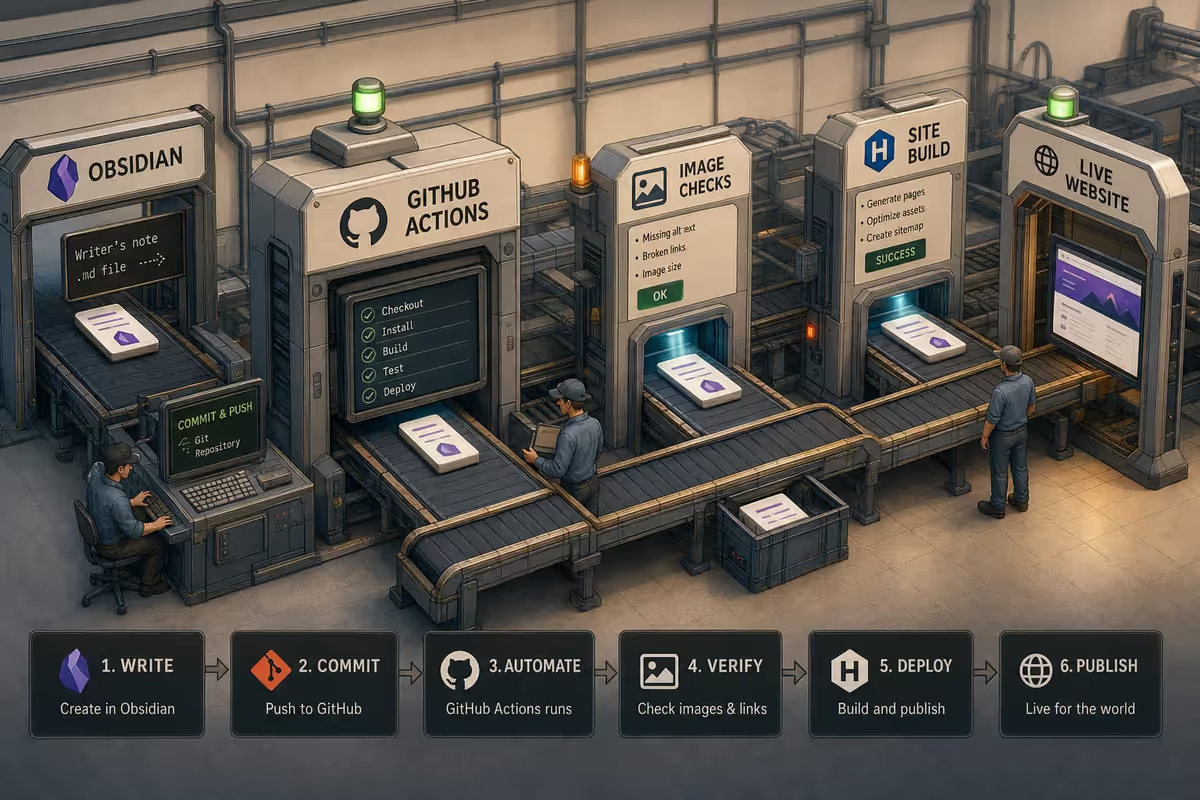
The Obsidian-to-site path in Petralian is simple on purpose:
- Drafts live in Obsidian.
- A sync step pushes the vault content to GitHub.
- A GitHub Actions workflow runs the publish logic.
- The publish step copies approved markdown into the site content folder and images into the public image folder.
- A Vercel deploy picks up the change after the repository update.
That architecture keeps content editing separate from site rendering. It also means the publish logic is code, not a set of manual browser steps.
A simplified version looks like this:
name: Publish Draftson: workflow_dispatch: schedule: - cron: "*/15 * * * *"jobs: publish: runs-on: ubuntu-latest steps: - uses: actions/checkout@v4 - run: node scripts/publish-from-vault.mjs env: VAULT_PATH: _vault/40_VSCode/PetralianThe exact script can change, and the trigger can change too. What should not change is the idea that publishing is a controlled pipeline, not a manual export.
How The Workflow Works
The core benefit comes from moving decisions into the script instead of asking a person to remember them.
The publish step can check frontmatter, validate image references, and decide whether a draft is ready. If a file is missing a required field, the workflow can stop before the site changes. If an article references a local image, the script can copy it into the right public folder automatically.
That is the real value of using GitHub Actions here. The workflow is not just a trigger. It is a gate.
For Petralian, that means the workflow can handle a few important jobs consistently:
- enforce the status of the content before publication
- normalize local image paths into site-safe image URLs
- move post files into the live content pipeline
- keep unpublished drafts out of the public site until they are approved
It also gives you a clean place to add future checks. If you want word count thresholds, SEO field validation, or image alt-text enforcement later, those checks belong in the workflow, not in a manual review checklist.
Why This Is Better Than A Manual Upload
A manual upload process puts memory at the center of the system. That is fragile.
A workflow puts rules at the center of the system. That is easier to trust.
The difference shows up in small ways. The writer can keep moving inside Obsidian without worrying about the site structure. The publish step can fail with a useful error instead of silently shipping something broken. And the site stays aligned with the note because the repo is carrying the content, not a copy that someone exported by hand three days ago.
That also makes the process easier to reuse elsewhere. If another site has the same basic shape, you do not need the same script. You only need the same idea: draft somewhere private, publish through a checked workflow, and let the repository handle the transition.
Additional detail
The Practical Tradeoff
This setup is not free.
You are taking on a small amount of automation work up front so you can avoid repeated manual work later. You also need to keep the publish script honest. If the checks are too strict, authors will fight the workflow. If the checks are too loose, bad content will still get through.
That balance is why the best version of this system is usually narrow and opinionated. It should do a few things very well rather than trying to become a full CMS.
Final Result
The useful version of an Obsidian-to-GitHub publish workflow is not just "sync notes to a repo." It is a content pipeline with a clear boundary between writing and publishing.
In Petralian, that means drafts can stay in Obsidian, the publish logic can live in GitHub Actions, and the live site only changes when the workflow says it should. The result is less friction for the writer and fewer surprises for the site.
If you want to build the same thing elsewhere, start with the smallest version possible: a draft folder, a publish script, and one GitHub workflow that only ships content after it passes the checks you actually care about.
That is enough to turn Obsidian from a note-taking app into a reliable publishing surface.
Common mistakes (Obsidian CI publishing)
| Mistake | Symptom | Fix |
|---|---|---|
| Committing vault plugins and cache | Bloated repo and failed builds | Curate .gitignore for publish folder only |
| No frontmatter validation in CI | Broken builds on publish day | Lint required fields in Action |
| Absolute image wikilinks | Missing assets on site | Normalize paths in transform step |
| Manual copy step before push | Defeats automation purpose | Single repo or scheduled sync job |
| Skipping preview deploys | Typos hit production | PR preview per branch |
FAQ
Do I need two repos or one?
One repo is simpler; two works if vault must stay private—sync subset only.
What triggers the GitHub Action?
Push to publish folder, workflow_dispatch, or schedule—match your editing cadence.
How are Obsidian wikilinks handled?
Transform to site-relative links in CI or use compatible markdown processor.
Can non-technical editors use this?
Yes in Obsidian if frontmatter template and folder rules are documented.
What should CI validate?
Frontmatter, image existence, link targets, and build success before merge to main.
If you're new to Cursor: 50% off your first month (code JP5ARNKSFI2Q). I may earn usage credits; install directly if you prefer.
Weekly email with new posts on enterprise AI and how teams ship it.
One email per week. Unsubscribe anytime.