Knowledge Work Engine Series (Part 0 — hub)
Next: Part 1 — Project management · Part 2 — Leadership · Part 3 — Marketing & voice
Foundation: External Memory Series · Harness memory loop
What is a knowledge work agent engine?
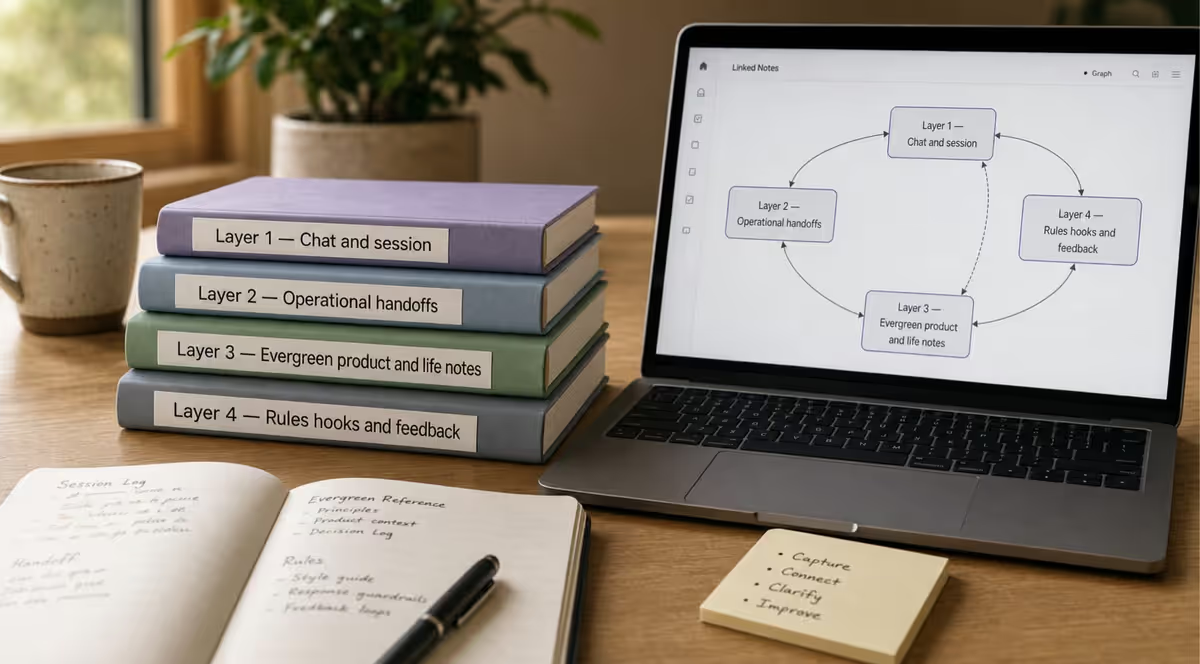
A knowledge work agent engine is a file-based operating system for AI-assisted PM, leadership, and marketing. It is not a chatbot plugin. It combines four memory tiers, a routing policy (WORK-ROUTING.md), session footers, optional batch workers, and (for content) a voice layer—so every assistant session reads the same handoff files instead of reinventing context.
Who it is for: program managers, team leads, and marketers who already use Jira, a wiki, or a task app and want AI output that stays aligned with sprint goals, decisions, and brand voice.
What you will learn: how the engine complements Agile and Confluence; how to set it up in one folder with any AI tool; and where Part 1, Part 2, and Part 3 go deeper.
Who this is for — and what it does not replace
| Good fit | Not a substitute for |
|---|---|
| PMs, solution leads, and delivery folks using AI beside Jira, ADO, or a wiki | Running the backlog or replacing your task tracker |
| Teams that lose context between chat sessions and need structured handoffs | Fully automated doc sync (Confluence/Jira stay authoritative; you curate links) |
| Programs that want human sign-off before AI drafts become official narrative | Hands-off AI on large, changing requirement sets without review |
| Marketers and leaders sharing the same file-based continuity model | A built-in peer review product (you wire Consulted reviewers via RACI + gates — Part 2) |
Part 1 goes deeper on complex scope, documentation drift, and review before publish.
TL;DR
- The same session-continuity engine that ships software can run initiatives, decisions, and content.
- Maps memory, voice, and routing to Agile, Jira, Confluence, RACI, and RAG—with a replication kit an AI can execute.
How to get started
This is not a product you install. It is a folder of markdown files plus a habit: tell the AI which files to read at session start, and write one line when you stop.
Below: how I run it (full example), then easier paths if you are not ready for an IDE stack.
Example implementation — how I run it
I use one folder per active project—an Obsidian vault slice or git repo—and open that folder as a Cursor workspace. The agent reads and edits markdown in place. I do not dump my whole drive or Jira export into chat; I curate a small handoff set and link out to execution tools.
1. Dual vault layout
| Vault | Holds | Example paths |
|---|---|---|
| Shared brain | Cross-project conventions, session footer contract, methodology | Brain/Conventions/, Brain/AI Agents/ |
| Per-project folder | Initiative or product truth for this engagement | Operations/, Initiatives/<name>/, memories/repo/ (code projects) |
Knowledge-work projects use the same idea: Operations/AI Session Bridge.md, Initiatives/<client>/Bridge.md, System/Profile/voice-guide.md. Code projects add Features/, AGENTS.md, and repo handoff files. Details for builders: External Memory Part 1.
2. Scaffold once per project
I paste the replication kit prompt into Cursor and let the agent create the file tree and starter content. That takes one session—not ongoing maintenance.
3. Layer 4 — what makes bootstrap automatic
| Mechanism | What it does |
|---|---|
.cursor/rules (alwaysApply) | Session protocol, bootstrap order, footer shape—loaded every chat |
AGENTS.md | Entry instructions for agents in the repo |
| MCP (filesystem / Obsidian) | Agent reads project vault + brain vault by path without me pasting |
sessionStart hook (optional) | Runs prep script, writes bootstrap snapshot / brain-pack |
| Batch subagents (optional) | Parallel workstreams—same files, not a separate product |
This is not a Cursor skill or Custom GPT by default. It is files + rules. Skills and Custom GPTs are optional packaging of the same bootstrap.
4. My session loop
- Start — Rules (and hook if enabled) point the agent at Layer 2:
AI Session Bridge, initiativeBridge, last lines ofSession Summaries,voice-guidewhen drafting prose. - Work — Agent edits curated markdown; Jira/Confluence stay authoritative for tickets and published narrative.
- Close — One line in
Session Summaries; updateBridgeif priority shifted; footer block (what changed, memory paths, next action).
Next Monday: new chat, same reads, caught up in seconds from disk—not vendor memory.
Proof elsewhere on this site: Obsidian second brain · Harness memory loop.
My stack vs the minimum
| I use | What it does | You can start with |
|---|---|---|
| Cursor workspace per project | Edit files in vault/repo | Any chat + paste bootstrap |
| Dual vault (brain + project) | Shared rules + local truth | Single folder |
.cursor/rules | Auto-load bootstrap policy | Manual paste each session |
| MCP (Obsidian/filesystem) | Read vault by path | Attach files or paste excerpts |
sessionStart hook | brain-pack / prep script | Skip until Path A works |
| Batch subagents | 3+ parallel tracks | One assistant session |
Start here if you are new (you do not need my stack)
Three questions:
- Do you ship code in this folder? → Consider Path C after Path A works.
- Only PM, leadership, or marketing? → Path A or Path B.
- Tired of pasting every session? → Graduate to Path C; see External Memory Part 1.
What you are building
| Piece | What it is | What it is not |
|---|---|---|
| Files | ~5–15 curated markdown notes in one folder | Your entire hard drive or Jira export |
| Bootstrap | Paths the AI reads first each session | Pasting 200 pages into chat |
| Routing | WORK-ROUTING.md — load rules by situation | One giant context dump every turn |
| Continuity | Session Summaries + Bridge updated at session end | Hoping ChatGPT "remembers" |
Where files live
| Host | Good for | Continuity |
|---|---|---|
| Obsidian vault folder | Linked notes, PARA or per-client folders | Same bootstrap files |
| Git repo | Code + docs together | memories/repo/, commit handoffs |
Plain Documents/ProjectX/ | Fastest start | Paste + manual edits |
| Cloud wiki | Enterprise readers | Engine folder beside wiki; link, don't mirror |
Continuity = files you update when you stop, not which app hosts them.
Path A — Chat only (30 minutes)
Step 1 — Create one folder (~/KnowledgeWork/ or an Obsidian vault).
Step 2 — Create three files (or run the replication kit once):
KnowledgeWork/ Operations/ AI Session Bridge.md Session Summaries.md Initiatives/<YourProject>/Bridge.md System/Profile/voice-guide.md ← skip if not writing content yetStep 3 — Starter prompt (paste into any AI):
Read these files in order, then reply with a 4-line kickoff (objective, top open loop, risk, first action):1. Operations/AI Session Bridge.md2. Initiatives/<YourProject>/Bridge.md3. Operations/Session Summaries.md (last 5 lines only)Do not invent facts not in the files. If a file is missing, say so.Step 4 — Close: one line in Session Summaries; update Bridge if priority moved.
If session four needs less re-explanation, the engine works. Do not add Cursor, MCP, or extra agents until then.
Path B — Notes vault + paste
Same files as Path A inside Obsidian (or Logseq). Use wikilinks between Bridge and _Home. Still paste the starter prompt until you adopt Path C.
Path C — IDE workspace
My path above: open project folder in Cursor, scaffold with replication kit, add .cursor/rules + MCP + optional hooks. Builder walkthrough: How I start a new codebase.
Starter file tiers
| Tier | Files | When |
|---|---|---|
| Minimum (3) | AI Session Bridge, Session Summaries, one Bridge.md | Proving the loop |
| Standard (7) | + WORK-ROUTING, voice-guide, _Home, Open Loops | One initiative in production |
| Full kit | + Decisions/, Editorial/, RAID, RACI | Part 1–3 playbooks active |
First session: two prompts
My setup (Cursor) — rules already point at bootstrap; say: "Follow session protocol. Read Bridge and Session Summaries; 4-line kickoff."
Starter (any chat) — use the Path A paste block above.
What to put in the folder (and what to leave out)
| Put in the engine folder | Leave in existing tools |
|---|---|
Sprint intent (Bridge.md) | Backlog and tickets (Jira, Asana, Linear) |
| Decisions and options considered | Published SteerCo decks (Confluence) |
| Voice and editorial rules | Brand PDF (link; don't rely on PDF for agents) |
| Session log (one-liners) | Email threads and Slack scrollback |
| Links to canonical sources | Duplicating entire wiki into markdown |
How continuity works (session to session)
| Step | What happens |
|---|---|
| 1. Start | New chat or IDE agent. Paste bootstrap—or rules/MCP load the same paths. |
| 2. Kickoff read | Bridge, AI Session Bridge, last Session Summaries lines, voice-guide if writing. Not the full archive. |
| 3. Work | Draft briefs, RAID, emails. AI edits markdown when asked. |
| 4. Close | One summary line; update Bridge if needed; optional footer. |
| 5. Next session | Same bootstrap → caught up from files. |
Other ways to run the same files
| Question | Answer |
|---|---|
| Skill or Custom GPT? | Optional packaging. Core is files + bootstrap instructions. |
| MCP? | Optional. Lets IDE agents read vault paths. Path A uses paste or attachments. |
| Many agents? | No. One session + files. Batch orchestrator is optional for 3+ tracks (Part 1). |
After Path A works
- Full scaffold: replication kit
- PM / Jira: Part 1
- Builders: External Memory Series
Getting oriented
The problem: chat is not a program office
Project management, leadership, and marketing all produce durable artifacts: decisions, briefs, stakeholder updates, brand copy, editorial calendars. Chat produces scrollback.
When the assistant forgets last week's priority, the failure is usually not model quality. It is no inspectable handoff surface between sessions, tools, and people. Product memory inside one vendor does not travel to your IDE, a teammate's chat tab, or next quarter's you.
A file-based engine (folders + markdown in Obsidian, Logseq, a git repo, or any wiki that exports plain text) can run the same patterns used for AI-assisted software work: four memory tiers, a routing policy, session footers, and optional batch workers. The same structure runs non-coding work when you swap code artifacts for initiative, decision, and editorial files—and add a voice layer for consistency.
This page is the map and the replication kit. Structured so you—or an AI pointed at this article—can scaffold the same system in one afternoon.
Why it matters (four outcomes)
| Outcome | What breaks without it | What the engine provides |
|---|---|---|
| Memory | Re-explaining context every Monday | Layer 2 bridge + session summaries |
| Consistency | Different tone in email vs blog vs slides | Layer 3 voice guide + preferences |
| Voice | Generic "AI slop" prose | Explicit filler bans + first-person rules |
| Marketing | Drafts that drift from brand | Editorial gates + promotion rules |
The engine does not replace judgment. It records judgment in files the next session can read.
How this relates to PM frameworks
Agile, Scrum, Kanban, and phase-gate programs already define execution (Jira), narrative (Confluence), and ceremony. None of them define what an AI assistant must read at session start.
| You already have | Engine adds |
|---|---|
| Sprint Goal in Jira | Bridge.md agent bootstrap + sprint intent |
| RAID in a register | RAID.md curated for AI + link to issues |
| RACI on a slide | RACI.md with explicit agent-as-R rows |
| RAG in SteerCo packs | Defined scale + portfolio index |
| Definition of Done | Layer 4 checklist for AI outputs too |
Part 1 is the deep dive on iron triangle, Jira, Confluence, and applied AI routing. Parts 2–3 cover leadership commit modes and marketing voice.
Golden Circle across the series (Sinek)
Simon Sinek's Why → How → What appears in all three domain playbooks:
| Part | Why | How | What |
|---|---|---|---|
| PM | Initiative purpose (_Home.md) | WORK-ROUTING, ceremonies | Jira backlog, milestones |
| Leadership | Charter, belief | RACI, advisory/commit, Drucker steps | Decisions, comms |
| Marketing | Messaging pillars | Voice system, editorial gates | Blog, email, social |
The memory loop feeds lessons from What back into How (Layer 4) and, when strategic, Why (Layer 3).
Engine components
What the engine is (six components)
Think of six modules. Software teams often implement them with files like routing-policy.md and context-pack.md (names vary). Knowledge work uses the same logic with different filenames.
Example component chain (diagram syntax below is D2; redraw in Mermaid, Excalidraw, Figma, or a slide deck—the relationships matter more than the tool.)
1. Memory tiers (four layers)
Same model as the External Memory Series. Short version:
| Tier | Holds | Knowledge-work examples |
|---|---|---|
| L1 | Current chat, today | This thread, today's daily note |
| L2 | Resume next session | Bridge.md, Session Summaries.md, open loops |
| L3 | Evergreen truth | Initiative scope, stakeholder map, voice-guide.md |
| L4 | Hardened lessons | Agent instructions, writing guide, footer contract |
Promotion rule: If you explained a fact twice, promote it from L2 to L3. If a mistake repeated twice, promote a fix to L4.
2. Routing policy (WORK-ROUTING.md)
Mirrors the routing discipline in lightweight agent harnesses: do not load everything for a small question.
| Situation | Route |
|---|---|
| One quick question | Direct chat, Mode A footer, skip context-pack |
| One deliverable (one brief, one email) | Direct + read Bridge + relevant L3 note |
| 3+ parallel workstreams | Batch orchestrator pattern (see Part 1) |
| Publish or record a decision | Run quality gate; Mode D-style footer |
3. Session contract (footer modes A–G)
Every work reply: session context at the top (what was read, current priority), footer at the bottom (what changed, where memory was written, what's next).
For knowledge work, interpret modes loosely:
| Mode | Knowledge-work trigger |
|---|---|
| A | Pure Q&A, no file edits |
| B | Research, read vault, no writes |
| C | Drafts edited, not "shipped" |
| D | Decision recorded, article moved to publish queue, milestone committed |
| E | Cross-program policy change (e.g. updates voice guide for all initiatives) |
Canonical spec: session footer contract (define your own modes A–G or a shorter shape—the point is a fixed closing block).
4. Voice layer (Layer 3 evergreen)
Coding stacks often skip voice. Marketing and leadership cannot.
Minimum file: System/Profile/voice-guide.md
| Section | Contents |
|---|---|
| Person | First person I / my on this blog; you for the reader |
| Banned fillers | actually, honestly, basically, clearly, leverage, etc. |
| Format | Tables for reference; short paragraphs for narrative |
| Claims | No invented experience; cite or mark as structural argument |
| Domain add-ons | PM: name owners; Leadership: name decision and date; Marketing: link writing guide |
Point every content-producing agent at this file before drafting.
5. Quality gates
| Domain | Gate before "done" |
|---|---|
| PM | Open loops updated; Session Summaries one-liner |
| Leadership | Decisions/YYYY-MM-DD topic.md exists; stakeholders named |
| Marketing | Writing guide checklist; anonymization pass before publish |
6. Tool connectors
Files are the contract—not Claude memory, not ChatGPT threads. Connect via:
- Paste bootstrap at session start (lowest friction)
- Filesystem MCP or API read (IDE agents)
- Custom instructions block pointing at file paths
Coding → knowledge work translation
| Coding (example names) | Project management | Leadership | Marketing |
|---|---|---|---|
routing-policy.md | WORK-ROUTING.md | same + decision triggers | + CONTENT-ROUTING.md |
Features/* | Initiatives/<name>/ | Programs/, Decisions/ | Brand/, Editorial/ |
context-pack.md | context-pack.md | leadership context-pack | voice-pack (guide + 3 samples) |
| Technical spec / RFC | Initiative brief | Decision note | Article draft + metadata |
| Automated checklist | Milestone checklist | Decision review | Pre-publish checklist |
| Ship / deploy | Phase shipped | Decision communicated | Publish-ready folder |
Reference
Replication kit
Replication kit (give this to an AI)
Copy the block below into any assistant with write access to your knowledge base (Obsidian vault, git repo, SharePoint library, etc.). I use this prompt in Cursor to scaffold a new project folder in one pass. It creates a minimum viable engine—not chat advice.
Prompt: scaffold the knowledge work engine
You are building a file-based knowledge work engine. Create the following structure and fill each file with the template content provided. Use my knowledge-base root: <ROOT> (folder path or vault URI).### Folder scaffold<ROOT>/ System/ Profile/ context.md # role, active domains, quarter focus preferences.md # how AI should behave (brief bullets) voice-guide.md # tone, banned words, claim rules _session_startup.md # bootstrap prompt (paths only, no duplicated content) Operations/ AI Session Bridge.md # current priority, open loops, next action Session Summaries.md # one line per work block Open Loops.md WORK-ROUTING.md # routing table (see template) Initiatives/ _template/ Bridge.md # per-initiative handoff _Home.md # evergreen scope for one initiative Decisions/ _template-decision.md Editorial/ # skip if not doing content 00-writing-guide.md # or link to existing guide### WORK-ROUTING.md template| Situation | Route | Memory to load | Footer mode ||-----------|-------|----------------|-------------|| Quick question | Direct | None | A || One deliverable | Direct | Bridge + relevant L3 | B or C || 3+ parallel tracks | Batch orchestrator | Bridge + context-pack once | C || Record decision | Decision workflow | Decisions template | D || Publish content | Editorial pipeline | voice-guide + writing guide | D |Rules:- Do not paste full chat history into sub-prompts.- End every work session with Session Summaries one-liner + footer.- Promote facts explained twice from L2 to L3.### voice-guide.md minimum (10 bullets)1. First person for my actions and setup (I/my, not my name in third person).2. No hedge words: actually, honestly, basically, clearly.3. No corporate filler: leverage, synergy, landscape.4. Tables for reference; 2-4 sentence paragraphs.5. No statistics without source.6. No first-person field stories unless human verified.7. Name the decision owner and date in leadership docs.8. American English.9. Session end: offer to update Bridge and Open Loops.10. Link related notes; no orphan captures.### Bootstrap block (_session_startup.md)At session start, read in order:1. System/Profile/context.md2. System/Profile/preferences.md3. System/Profile/voice-guide.md4. Operations/AI Session Bridge.md5. Operations/Session Summaries.md (last 5 lines)6. Today's daily note if presentProduce 4-line kickoff: objective, urgent open loop, risk, first action.After creating files, confirm paths and suggest one 15-minute test task.File templates (human or AI)
Operations/AI Session Bridge.md
# AI Session Bridge### Current priority<one line>### Open loops- [ ] ...### Next physical action<one line>Initiatives/_template/Bridge.md
# <Initiative name> — Bridge### Status<green / amber / red + one line>### This week1. ...### Blockers- ...### Decisions pending- ...### Links- Evergreen: [[_Home]]Decisions/_template-decision.md
# Decision: <title>Date: YYYY-MM-DDOwner: <name>### Context<2-4 sentences>### Options considered| Option | Upside | Downside ||--------|--------|----------|### Decision<one paragraph>### Who was informed- ...### Review dateYYYY-MM-DDAdvanced: harness patterns without code
You do not need custom IDE agents for knowledge work. Optional patterns when volume grows:
| Pattern | When | Mechanism |
|---|---|---|
| Batch orchestrator | 3+ parallel workstreams | Parent prompt dispatches child tasks with compact JSON one-line returns |
| Reviewer pass | High-stakes decision or publish | Second prompt: spec check against voice-guide + checklist only |
| context-pack | Same initiative daily | Auto-generated embed: Bridge + last 5 summaries + links to L3 (not full archive) |
| Footer validation | Team compliance | Optional script or rule that checks footer shape (see memory loop patterns) |
Subagents do not inherit your rules. Paste worker directives into every dispatch—keep sub-prompts short and never paste full session history (dispatch hygiene).
How the series continues
| Part | Focus | Read if you… |
|---|---|---|
| Part 1 — Project management | Agile, Scrum, Jira, RAG, RAID, iron triangle | Run delivery with AI + Jira |
| Part 2 — Leadership | Sinek, Drucker, RACI, advisory vs commit | Own decisions and SteerCo comms |
| Part 3 — Marketing | Voice system, content-batch, atomization | Scale content without voice drift |
Myth vs reality (knowledge work AI)
| Myth | Reality |
|---|---|
| "One Custom GPT replaces a program office" | Files + routing + footers beat opaque vendor memory |
| "Paste the wiki into chat" | Curated context-pack beats full export |
| "More AI tools = more productivity" | Shared bootstrap across tools beats tool sprawl |
| "Agents can own decisions" | Humans Accountable; agents draft at Responsible only |
| "This is only for developers" | Same engine runs PM, leadership, and marketing workflows |
Common mistakes (and fixes)
| Mistake | Why it fails | Fix |
|---|---|---|
| Pasting Confluence export into every chat | Token noise; stale narrative | Curated context-pack from Bridge + L3 only |
| No routing policy | Every question loads everything | WORK-ROUTING.md by situation |
| Agent listed as Accountable in RACI | False authority in drafts | Human A only; agent R on drafts |
| Style guide PDF nobody opens | Voice drifts at volume | Machine-readable voice-guide.md in bootstrap |
| Skipping session footer | No audit trail; memory rots | Fixed footer modes A–D minimum |
| Building agents before files | Automation on empty context | Scaffold replication kit first |
FAQ
Is this the same as RAG (retrieval-augmented generation)?
No. RAG is a technical pattern (embed documents, retrieve chunks, generate). This engine is an operational pattern: which files humans curate, when agents load them, and how lessons return to Layer 4. You can implement retrieval with RAG tools; the engine defines what must be retrievable.
Do I need Obsidian?
No. Any markdown knowledge base works: git repo, Logseq, Notion export, SharePoint library. Obsidian is one example.
Does this replace Jira or Confluence?
No. Jira owns execution. Confluence owns published narrative. The engine owns agent bootstrap and session continuity.
How is this different from ChatGPT memory or Custom GPTs?
Vendor memory is opaque and siloed. Files are portable, inspectable, and shared across Claude, Cursor, and teammates.
Can I point an AI at this article to build the system?
Yes. Use the replication kit prompt. Output should be files, not chat advice.
Where does this connect to the External Memory Series?
Same four tiers. This series applies that model to PM, leadership, and marketing with domain routing. Start with the External Memory hub if tiers are new.
Should I let the AI read my entire project folder?
No. Curate a handoff set (typically 4–6 files at session start). Link to Jira, Confluence, or large archives—do not mirror whole backlogs in markdown. See How to get started.
Do I need Cursor, MCP, or custom agents?
No for day one. Any chat tool works with Path A paste bootstrap. Cursor, MCP, and hooks are my Path C—optional accelerators. See Example implementation vs Path A.
How does continuity work if every chat is new?
Files are the memory. Session Summaries.md and Bridge.md are updated when you stop; the next session reads them cold. Vendor "memory" is optional and not portable.
Limitations
- File memory needs a five-minute session close habit or an agent following End of Session protocol.
- Over-documentation kills adoption. Use the promotion rule.
- Voice guides do not replace human review for sensitive leadership comms.
- Tool behavior changes; re-verify bootstrap paths after IDE upgrades.
- Does not auto-sync Jira/Confluence or replace formal peer-review tools — it gives structure, gates, and RACI hooks you can attach to existing review habits (Part 1).
Reader action
If you are starting from zero: Path A — chat only or run the replication kit once. Do not add tools first.
If you already use a markdown knowledge base: Add WORK-ROUTING.md and voice-guide.md. Link from External Memory Part 2.
If you want my full stack: Example implementation then Path C.
If you are an AI builder: Treat Part 0 as spec. Parts 1–3 are worked examples. Output should be files, not chat.
Sources
- External Memory Series hub
- Obsidian memory for personal productivity
- Cursor harness memory loop
- Deliberate file memory / governance
If you're new to Cursor: 50% off your first month (code
JP5ARNKSFI2Q). I may earn usage credits; install directly if you prefer.
Weekly email with new posts on enterprise AI and how teams ship it.
One email per week. Unsubscribe anytime.